
Annual agreements for organizers with several events
One agreement and one price for every event you start in a period, with a volume discount. Covered events move to the plan automatically.
On this page
If you run several events a year, an annual agreement covers all of them with one plan and one price. Every event your organization starts between the agreement's two dates is put on its plan automatically, with no checkout per event. Our team sets agreements up on the Starter, Growth, Pro or a Custom plan.
How pricing works
The price is the plan's per-event list price times the number of events, with a volume discount:
- 1–2 events: list price
- 3–5 events: 20% off the list price
- 6–11 events: 30% off the list price
- 12+ events: 40% off the list price
An agreement for unlimited events in the period is priced like 12 events. For example, 12 Starter events cost $2,868 instead of $4,788. Custom agreements are quoted individually.
Ask for an agreement
-
Step 1: Open the request form
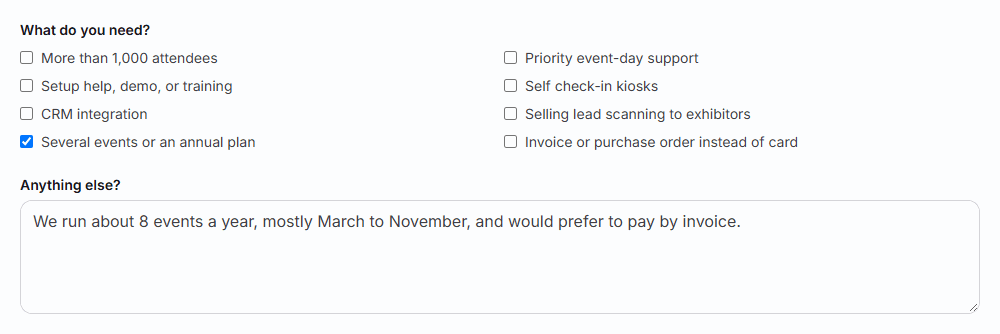
Go to badgetrac.com/billing/custom-plan?need=multi_event. Several events or an annual plan is already ticked under What do you need?.
-
Step 2: Describe your events
Enter your name, work email and Expected attendees for a typical event. Under Anything else?, say how many events you run a year, roughly when, and whether you'd rather pay by invoice.
-
Step 3: Send
Click Request a quote. We reply by email with the plan, the dates covered, how many events are included and the price.
Tip: Running only a couple of events, or not sure of the dates yet? Event packs are prepaid events you can use on any event within 365 days, bought by card without talking to us.
Pay and get covered
-
Step 1: Pay
Pay the invoice we send, or open the secure Stripe payment link in our email and pay by card.
-
Step 2: Let Badgetrac cover your events
Once the agreement is paid, every event that starts between its two dates moves to the agreement's plan: existing events straight away, and new ones as you create, duplicate or import them from Eventbrite.
-
Step 3: Check an event
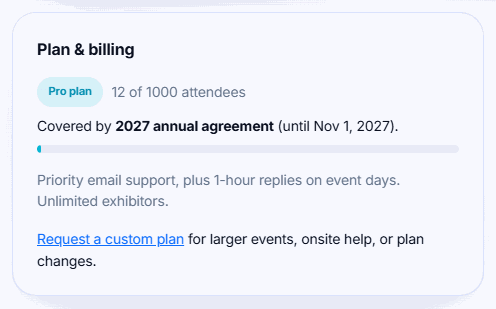
Open the event's Event settings. The Plan & billing card shows Covered by your agreement's name and the date it runs until.
A card payment through the Stripe link is confirmed within a few minutes. If you pay by invoice, we can agree to cover your events while the invoice is still open. Until then, the agreement doesn't cover any events.
Changing a covered event's plan
Covered events can't be upgraded from Event settings. Their plan comes from the agreement, so the upgrade options don't appear. To raise an event's plan or attendee limit, email info@badgetrac.com.
Events the agreement doesn't cover
- Outside the dates: an event that starts before or after the agreement's window isn't covered. Its Plan & billing card says so and shows the agreement's dates; choose a plan for it as usual.
- Event limit reached: if your agreement includes a set number of events and they're all used, the card says the agreement has no events left. Contact us to extend it, or choose a plan for that event.
- Already paid on an equal or higher plan: the event keeps what it has. An event paid on a lower plan moves up to the agreement's plan.
- After the agreement ends: covered events keep their plan, even if one is later moved outside the dates. Events starting after the end date need their own plan or a new agreement.
Questions about an agreement? Write to info@badgetrac.com.
Related guides
- Save with multi-event packs Prepay for several events at a discount and use one on any of your organization's events within a year.
- Request a custom plan Ask for a quote for larger events, priority support, invoicing, or several events a year. Pay from event settings once agreed.
- Choose a plan and what happens if you go over How attendee limits work, which tickets count, the grace margin over your limit, and how to upgrade without losing what you paid.
Still stuck?
Tell us what you were trying to do and what you saw. We'll help you sort it out.