
Save with multi-event packs
Prepay for several events at a discount and use one on any of your organization's events within a year.
On this page
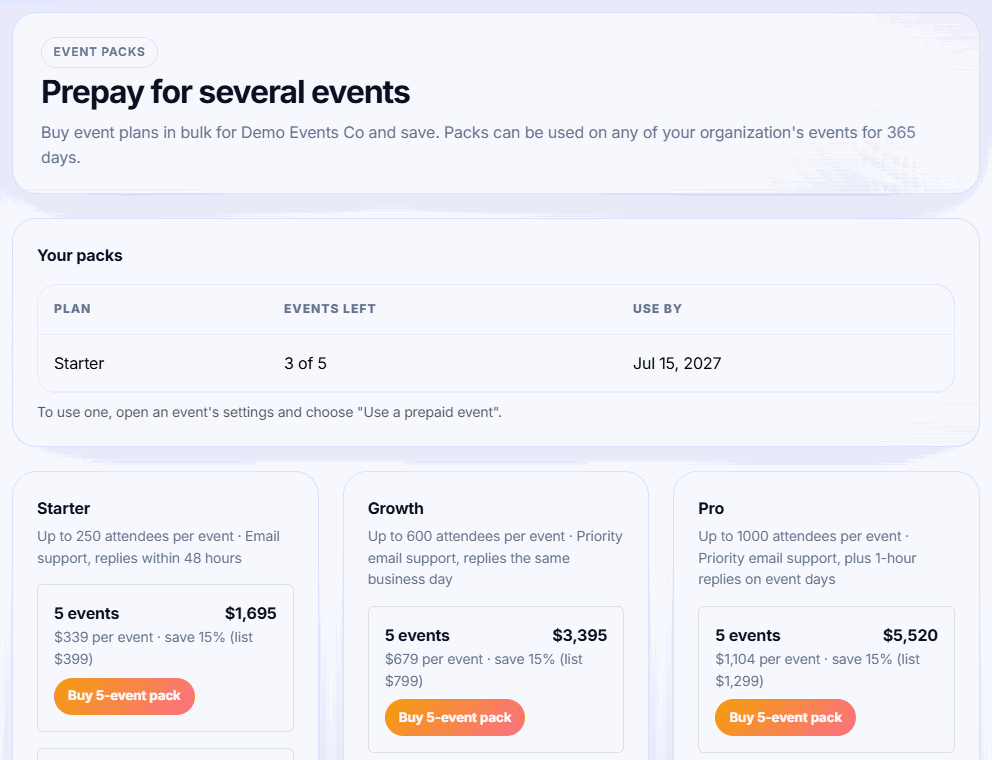
If you run several events a year, buy their plans in advance at a discount. A pack is a set of prepaid events on one plan that anyone in your organization can use on any event.
Pack options
- 5 events: 15% off the list price
- 10 events: 25% off the list price
Packs are available for every self-serve plan (Starter, Growth, Pro) and can be used for 365 days from purchase. For example, 10 Starter events cost $2,990, or $299 per event.
Buy a pack
-
Step 1: Open the packs page
On an unpaid event's Plan & billing card, click Save up to 25% with event packs.
-
Step 2: Choose a plan and size
Pick the plan your events usually need, then a pack size.
-
Step 3: Pay
Click Buy … pack and pay by card. The pack appears under Your packs with the events left and the use-by date.
Use a prepaid event
-
Step 1: Open the event
Open the unpaid event and go to Event settings.
-
Step 2: Redeem
In Plan & billing, click Use a prepaid … event. The event moves to that plan straight away, with no checkout.
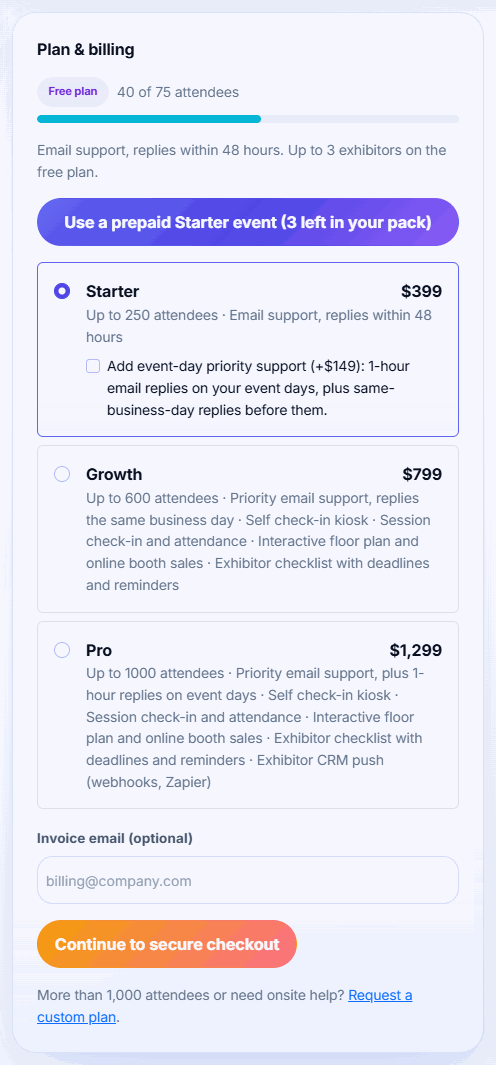
Tip: Badgetrac picks the smallest plan in your packs that covers the event's current attendees, and the pack that expires soonest. The button only appears if you have a pack big enough for the event.
Good to know
- Packs belong to your organization, so every organizer in it can use them.
- A redeemed event counts as paid at the pack's per-event price. If it later needs a bigger plan, upgrading costs the difference from that price.
- Unused events expire after 365 days and disappear from Your packs.
- Promo codes can't be used on packs, and packs can only be redeemed on events that don't have a plan yet.
Need a bigger pack, an annual contract or invoicing instead of a card? Request a custom plan.
Related guides
- Annual agreements for organizers with several events One agreement and one price for every event you start in a period, with a volume discount. Covered events move to the plan automatically.
- Choose a plan and what happens if you go over How attendee limits work, which tickets count, the grace margin over your limit, and how to upgrade without losing what you paid.
- Upgrade an event to a bigger plan Move an event to a larger plan when it outgrows its limit. You only pay the difference from what you already paid.
- Request a custom plan Ask for a quote for larger events, priority support, invoicing, or several events a year. Pay from event settings once agreed.
Still stuck?
Tell us what you were trying to do and what you saw. We'll help you sort it out.