
Rate, tag and add notes to leads
Tag each lead hot, qualified or cold and add notes so your sales team knows who to call first.
On this page
A list of names isn't much use after the show. Tagging each lead and writing a short note while the conversation is fresh tells your team who to call first and what to say.
Tag and note a lead
-
Step 1: Scan or open the lead
Scan the badge, or open Leads in your exhibitor workspace and tap the lead's note button.
-
Step 2: Choose a lead status
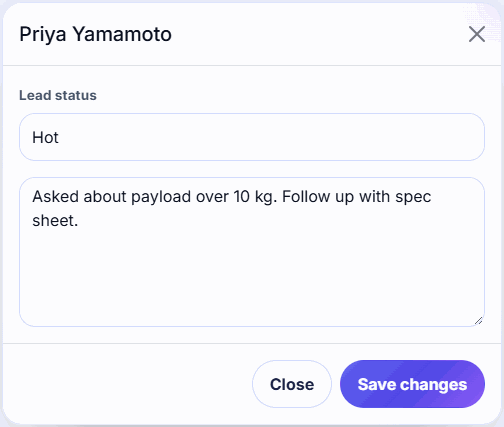
In Lead status, pick Hot, Qualified or Cold. Leave it on No tag if you're not sure yet.
-
Step 3: Write a note
Type what you talked about and the next step, for example Wants a demo in March, call Tuesday.
-
Step 4: Save
Tap Save changes (Save in the app).
Which status to use
| Status | Use it for |
|---|---|
| Hot | Ready to buy or asked for a follow-up. Call within a day or two. |
| Qualified | A good fit with a real need, but not urgent. |
| Cold | Just browsing, a student, a competitor, or a raffle entry. |
| No tag | Not decided yet. Review these after the show. |
Agree on these meanings with your booth team before doors open, so everyone tags the same way.
Tagging in one tap
On the Leads page, each row has Hot, Qualified and Cold buttons, so you can tag without opening the note. The note button reads Add note or Has note.
Writing useful notes
- Write the next step first: Send pricing, Book demo, Intro to sales engineer.
- Add what they care about: product, budget, timeline, team size.
- Notes can be up to 1,500 characters.
- If you close the note with unsaved changes, Badgetrac asks before throwing them away.
Tip: Tags and notes save offline too. They upload with your scans when you reconnect.
Your status counts appear on your Dashboard, and the organizer's results report shows your hot and qualified totals. Raffles can be limited to hot or qualified leads. See Run a raffle.
Related guides
- Install the lead scanning app and scan badges Add the Badgetrac scanner to your phone's home screen, download the attendee list, and scan badge QR codes, even offline.
- Export leads or send them to your CRM Download your leads as a CSV for HubSpot or Salesforce, or push every lead to a webhook the moment it's scanned.
- Run a raffle from your scanned leads Draw prize winners fairly from the badges you scanned, redraw if a winner isn't there, and download the winners list.
Still stuck?
Tell us what you were trying to do and what you saw. We'll help you sort it out.