
Run a raffle from your scanned leads
Draw prize winners fairly from the badges you scanned, redraw if a winner isn't there, and download the winners list.
On this page
A prize drawing brings people to your booth. Badgetrac draws winners from the badges you scanned, so every entry is a lead and you don't need a fishbowl of business cards.
Draw a winner
-
Step 1: Open Raffles
In your exhibitor workspace, click Raffles.
-
Step 2: Create a raffle
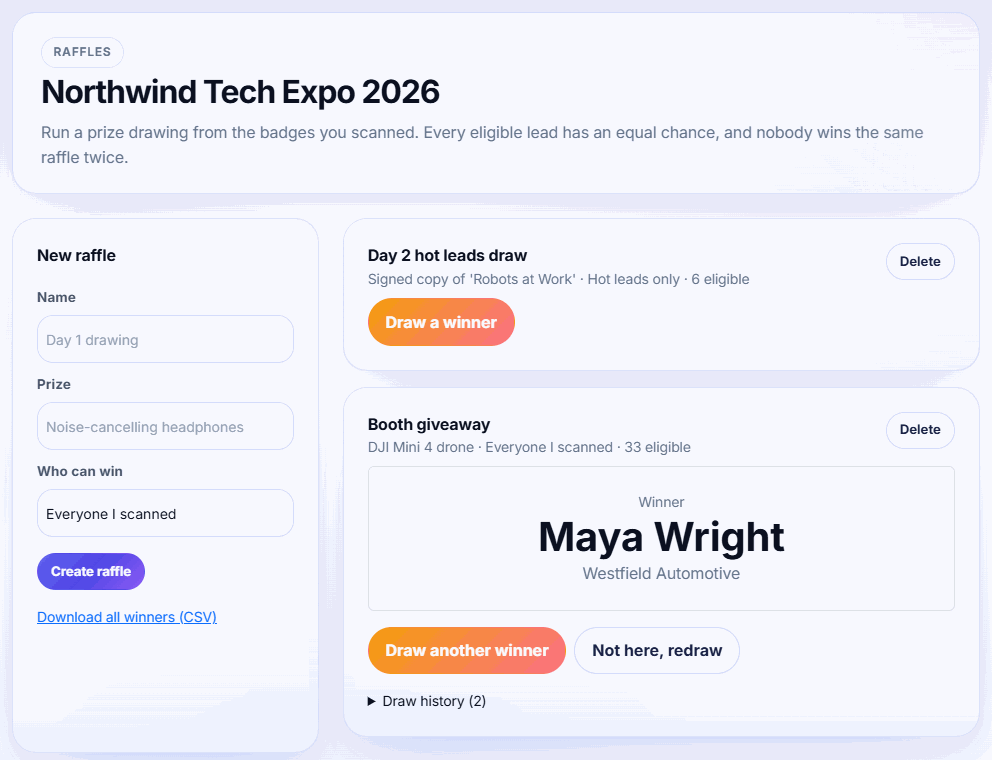
Under New raffle, enter a Name and Prize, and choose Who can win. Click Create raffle.
-
Step 3: Draw
Click Draw a winner. The winner's name and company appear.
-
Step 4: Redraw if needed
If the winner isn't there, click Not here, redraw. They can't win this raffle again.
-
Step 5: Download the winners
Click Download all winners (CSV) for your records.
Who can win
- Everyone I scanned: every lead you scanned at this event.
- Hot and qualified leads: only leads you tagged hot or qualified.
- Hot leads only: only hot leads.
Each raffle card shows how many people are eligible. Attendees whose tickets were cancelled or refunded are never drawn.
Fair draws
- Every eligible lead has the same chance, using a secure random draw.
- Nobody can win the same raffle twice, including people redrawn because they weren't there.
- Draw history lists every draw, with redrawn winners marked not here, redrawn.
- Winning one raffle doesn't stop someone winning another one. Create one raffle per prize.
Tip: Tell visitors when you'll draw (for example, 4 pm each day) and create a raffle per day, such as Day 1 drawing, so late visitors still have a chance.
If you see No eligible entries left, scan more badges or change Who can win in a new raffle. The winners CSV lists raffle, prize, name, email, company, when they were drawn, and whether they claimed the prize.
Related guides
- Install the lead scanning app and scan badges Add the Badgetrac scanner to your phone's home screen, download the attendee list, and scan badge QR codes, even offline.
- Rate, tag and add notes to leads Tag each lead hot, qualified or cold and add notes so your sales team knows who to call first.
- See exhibitor results and ROI Organizers see leads per exhibitor and email results; exhibitors get totals, hot leads, busiest hour and cost per lead.
Still stuck?
Tell us what you were trying to do and what you saw. We'll help you sort it out.