
Turn on contact exchange
Let attendees share their email, phone and LinkedIn when someone scans their badge with a phone camera. It's opt-in per attendee.
On this page
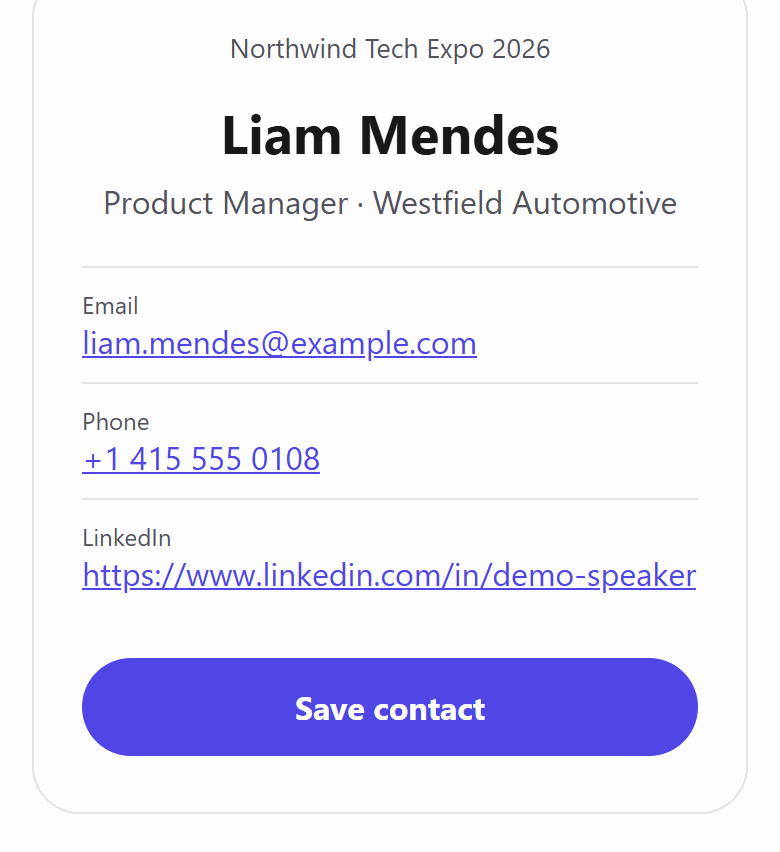
With contact exchange on, the QR code on each badge becomes a link. Anyone who scans it with a normal phone camera sees a small contact card, and attendees choose what that card shows. Exhibitors using Badgetrac's lead scanner keep seeing registration details as usual.
Turn it on
-
Step 1: Open the event overview
Open your event. The Badge proofs card on the overview holds the switch.
-
Step 2: Switch on contact exchange
Turn on Contact exchange. It saves straight away and applies to badges printed from now on.
-
Step 3: Let attendees opt in
Send badge proofs. Each attendee can add a LinkedIn link and tick the box to share their email, phone and LinkedIn.
-
Step 4: Print badges
Print badges after the switch is on. Their QR codes now open a contact card when scanned with a phone camera.
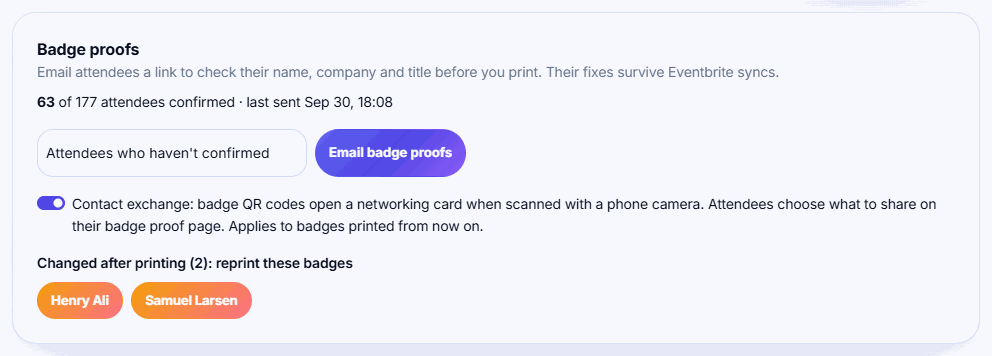
Badges printed before you turned it on don't change. Their QR codes still hold the plain attendee ID. Reprint them if you want those attendees to have the link.
What people see when they scan
- Always: the event name, the attendee's first name and company.
- Only if the attendee opted in: last name, job title, email, phone, LinkedIn, and a Save contact button that downloads a vCard.
- If they didn't opt in: Name hasn't shared contact details. Say hello in person!
Cancelled or refunded tickets show no card.
How attendees opt in
Attendees opt in on their badge proof page. With contact exchange on, the page adds a LinkedIn profile (optional) field and a checkbox to share email, phone and LinkedIn. Sharing is off by default. To send the links, see Send badge proofs to attendees (paid plans).
Does it break lead scanning?
No. Badgetrac's lead scanner, volunteer stations, kiosk and session door scanner all read the attendee ID back out of the link, so old and new badges scan the same way.
Related guides
- Send badge proofs to attendees Email attendees a link to check their name, company and title before you print. Their fixes survive Eventbrite syncs.
- Install the lead scanning app and scan badges Add the Badgetrac scanner to your phone's home screen, download the attendee list, and scan badge QR codes, even offline.
- Print badges one at a time or in batches Print a single badge as people arrive, or print a selection or every badge as one PDF before the event.
Still stuck?
Tell us what you were trying to do and what you saw. We'll help you sort it out.