
Print badges one at a time or in batches
Print a single badge as people arrive, or print a selection or every badge as one PDF before the event.
On this page
You can print badges on demand as people arrive, or print a stack in advance. Either way, printing a badge marks the attendee as checked in.
Before you print, save your layout in the badge designer and do a test print.
Print one badge
-
Step 1: Open Attendees
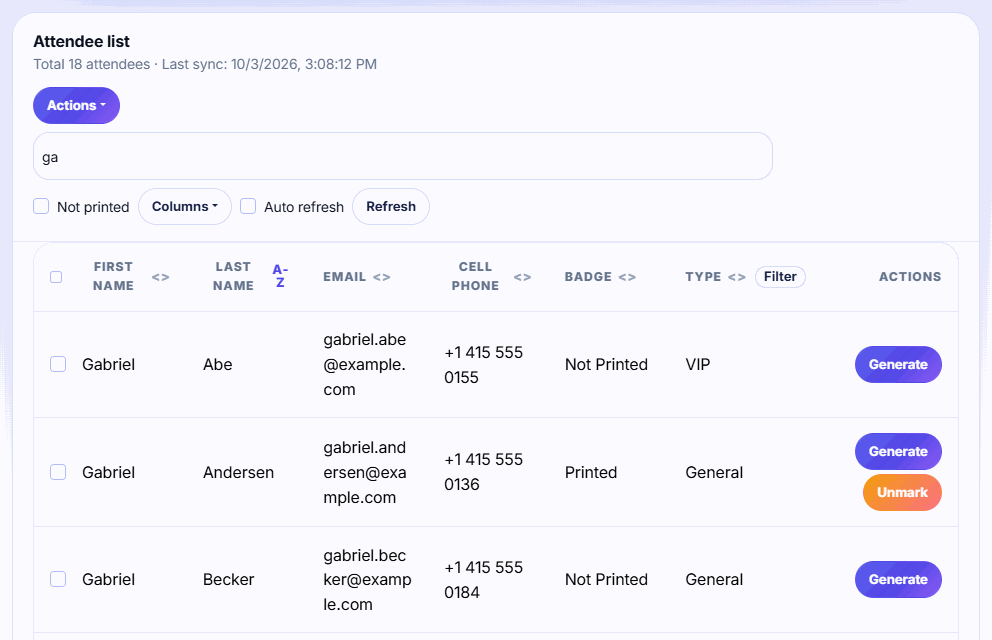
Open your event and go to Attendees. The Not printed box is ticked, so only people without a badge are listed.
-
Step 2: Find the person
Type a name, email, phone or company in the search box.
-
Step 3: Generate the badge
Click Generate on their row. The badge opens as a PDF in a new tab.
-
Step 4: Print it
Print from the PDF tab with your browser's print dialog. The attendee is now marked Printed and counted as checked in.
Print a batch
-
Step 1: Filter the list
Use the Not printed box, the search, or the Filter menu on the Type column to show only the badges you want.
-
Step 2: Select the rows
Tick the checkbox in the table header to select every visible row, or tick rows one by one.
-
Step 3: Print the selection
Choose Actions → Print Selected Badges (N). Keep the page open while the PDF is generated.
-
Step 4: Open the PDF
Open the downloaded
badges.pdf. It has one badge per page, sorted by last name. Print it in one go.
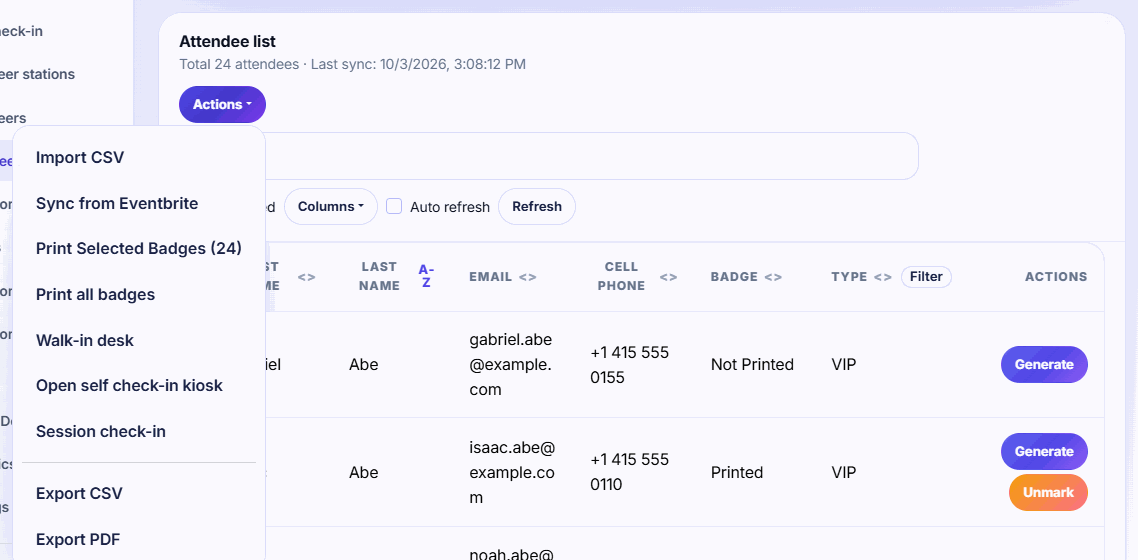
Print all badges really means all. Actions → Print all badges prints every attendee in the event, including badges already printed, whatever the search or filters show. To print only unprinted badges or one ticket type, filter and use Print Selected Badges.
While the PDF is being made
A progress bar shows how far along the batch is. Don't close or leave the page until badges.pdf downloads; the browser asks you to confirm if you try. Big batches can take a few minutes.
If you see Badge generation timed out, print a smaller selection, for example one ticket type at a time.
Printed status
- The Badge column shows Printed or Not Printed.
- Every badge in a batch is marked printed, so they drop out of the Not printed view.
- Printed something by mistake? See Handle reprints and read the print log to unmark it.
If printing is paused
If the Attendees page shows Printing and exports are paused, the event has more active attendees than its plan covers. On the Free plan the limit is 75 attendees. Paid plans keep working up to 10% over their limit. Click See plans to upgrade. Exhibitors can keep scanning either way. See Choose a plan and what happens if you go over.
Related guides
- Design your badge Set the badge size, place names, company, QR code and images in the badge designer, and save the layout used for every print.
- Printer and badge stock tips Match your badge size to your stock, set the print dialog to actual size with no margins, and test before doors open.
- Handle reprints and read the print log Reprint lost or wrong badges, unmark badges printed by mistake, and see reprints by reason and prints by desk.
Still stuck?
Tell us what you were trying to do and what you saw. We'll help you sort it out.