
Create your account and connect Eventbrite
Sign up as an organizer, connect your Eventbrite account, and find your Eventbrite events in Badgetrac.
On this page
Badgetrac works alongside Eventbrite: Eventbrite handles tickets and payment, and Badgetrac handles badges, check-in and exhibitor leads. You don't need Eventbrite to use Badgetrac. Without it, see Create an event without Eventbrite.
Create your account
-
Step 1: Open the sign-up page
Go to badgetrac.com/signup.
-
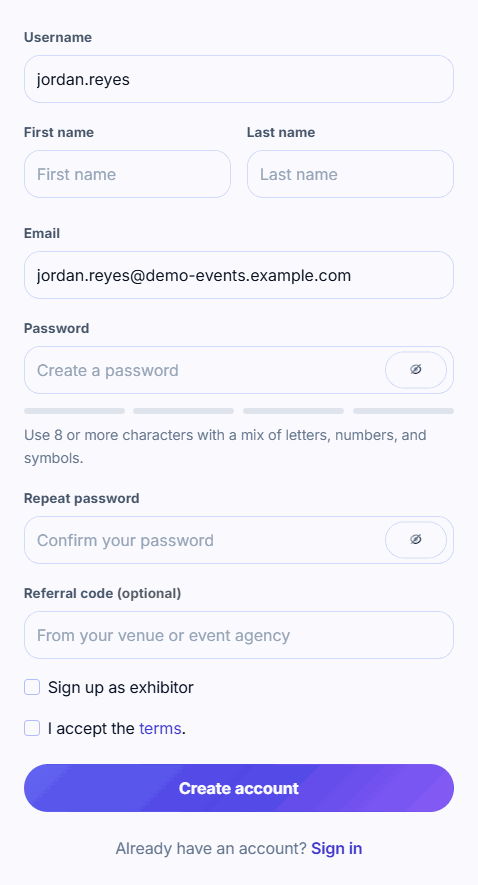
Step 2: Fill in your details
Enter a Username (lower-case letters, numbers, dots, dashes and underscores), your name, email and a password of 8 or more characters.
-
Step 3: Create the account
Leave Sign up as exhibitor unticked, accept the terms and click Create account.
-
Step 4: Sign in
Click Ok, got it!, then sign in with your email or username and password. You land on your Events page.
Exhibitors: don't sign up here. Use the link in the invite email from your organizer. It sets up an exhibitor account linked to the right event. See how exhibitor invites work.
Connect Eventbrite
-
Step 1: Start the connection
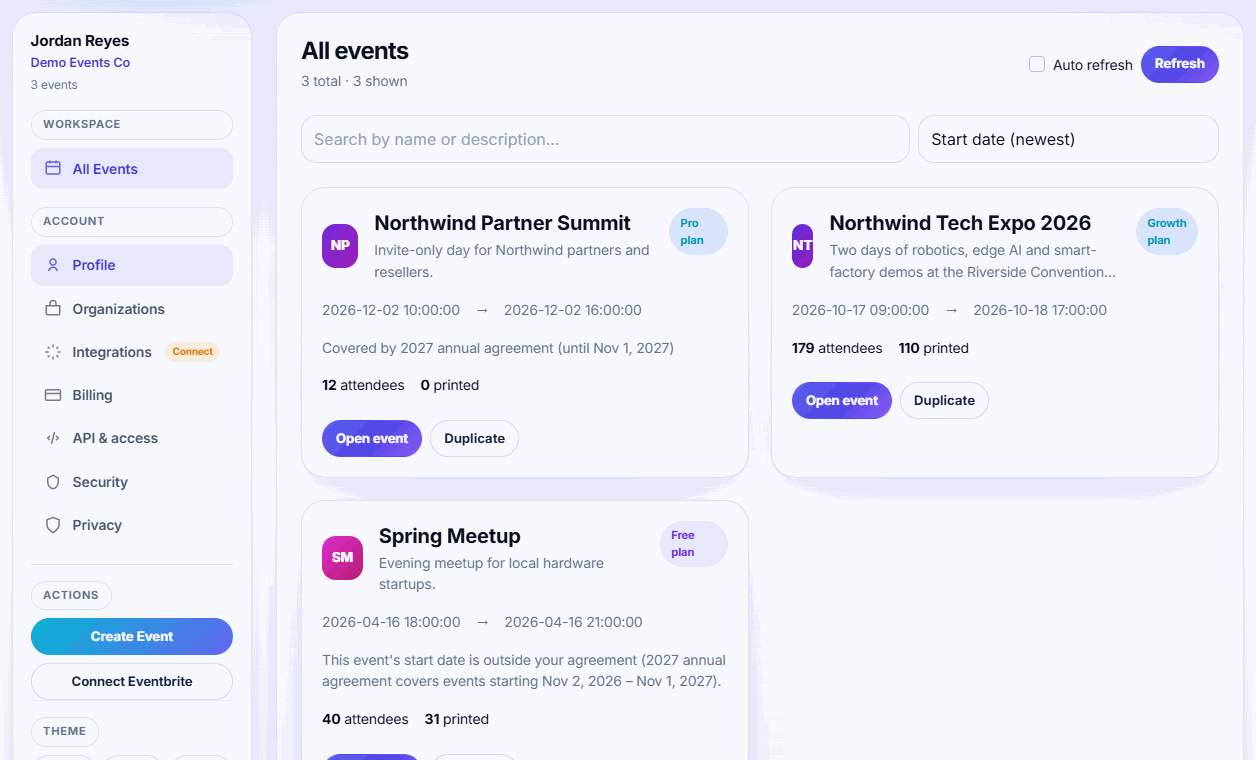
On the Events page, click Connect Eventbrite in the left sidebar under Actions.
-
Step 2: Allow access
Sign in to Eventbrite if asked and click Allow.
-
Step 3: Find your events
You're sent back to Badgetrac. Your Eventbrite events now appear as cards on the Events page.
-
Step 4: Pull in attendees
Open an event and choose Actions → Sync from Eventbrite on the Attendees page.
What connecting does
- Imports every Eventbrite organization your account belongs to, and every event in them. You're added to each organization in Badgetrac, so colleagues in the same Eventbrite organization see the same events.
- Keeps event names and dates up to date when you change them in Eventbrite.
- Doesn't import attendees yet. Run Sync from Eventbrite on each event you want to use.
Every event starts on the Free plan, which covers up to 75 attendees and 3 exhibitors. You choose a plan per event. See Choose a plan and what happens if you go over.
Reconnecting or disconnecting
Open Account settings from the menu under your avatar (top right) and find Eventbrite Connection:
- Reconnect if syncs fail with Eventbrite token is missing, or after you change Eventbrite passwords.
- Disconnect removes Badgetrac's access to Eventbrite. Events and attendees already imported stay in Badgetrac, but you can't sync again until you reconnect.
Use the Eventbrite account that owns the events. If your events don't appear, you probably connected a different Eventbrite login. Click Reconnect Eventbrite and sign in with the right one.
Related guides
- Sync attendees from Eventbrite Pull every Eventbrite registration into Badgetrac, re-sync before the event, and see how cancelled tickets are handled.
- Create an event without Eventbrite Set up an event by hand when your registrations live somewhere else, then add attendees from a CSV or at the door.
- Choose a plan and what happens if you go over How attendee limits work, which tickets count, the grace margin over your limit, and how to upgrade without losing what you paid.
Still stuck?
Tell us what you were trying to do and what you saw. We'll help you sort it out.