
Collect exhibitor tasks with a checklist
Ask exhibitors for logos, answers, confirmations and staff lists with due dates, review what they send, and let reminders chase.
On this page
Plan: Exhibitor checklist with deadlines and reminders is included on the Growth and Pro plans and on Custom plans. On a smaller plan you'll see an upgrade page instead. Compare plans.
The exhibitor checklist replaces the spreadsheet of who has sent their logo, staff names and forms. Each exhibitor sees the same tasks in their workspace, and Badgetrac sends the reminders.
Set up the checklist
-
Step 1: Open Exhibitor checklist
Open your event and click Exhibitor checklist in the left sidebar.
-
Step 2: Add a task
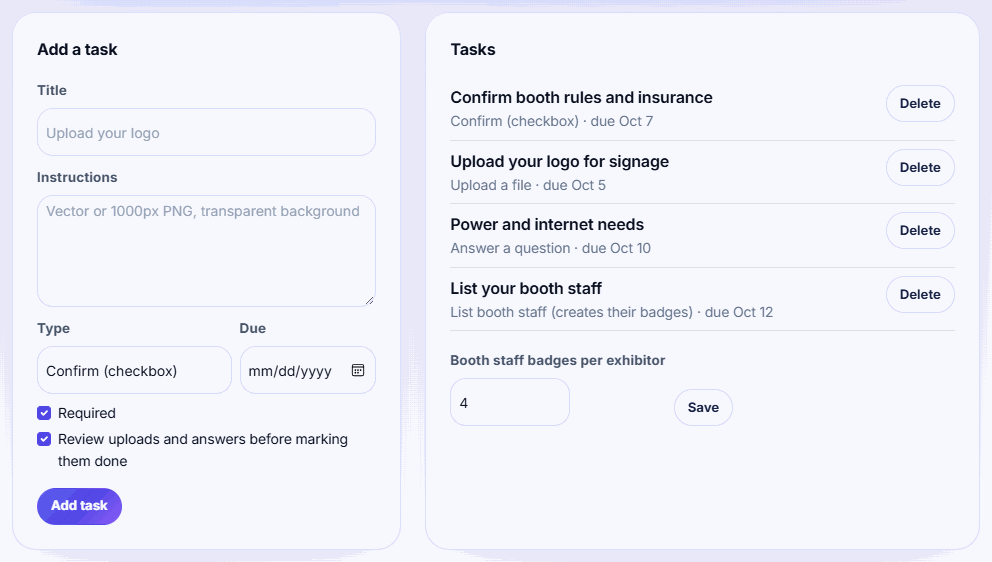
Under Add a task, enter a Title and Instructions, pick a Type and a Due date, then click Add task.
-
Step 3: Set the staff badge quota
Under Booth staff badges per exhibitor, enter how many staff each exhibitor can list and click Save.
-
Step 4: Review submissions
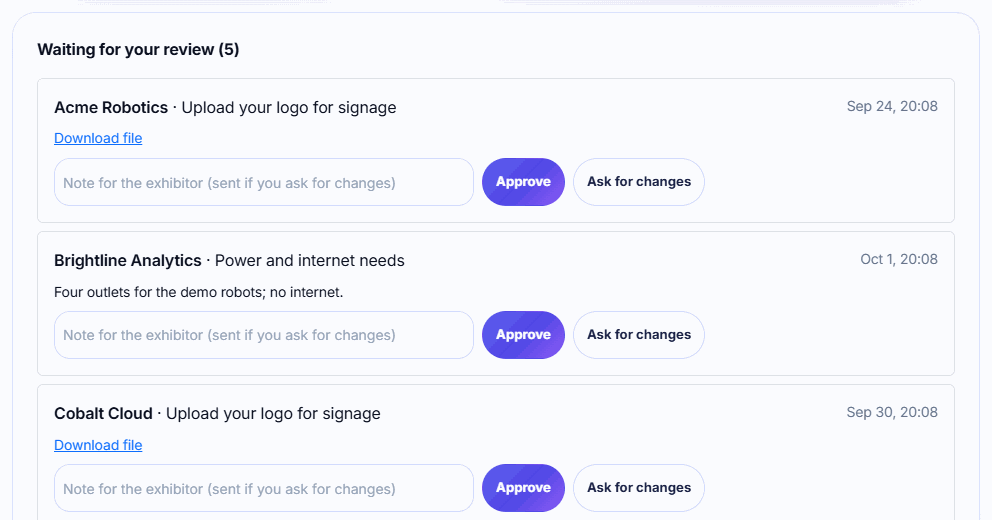
Under Waiting for your review, click Approve, or add a note and click Ask for changes.
-
Step 5: Track progress
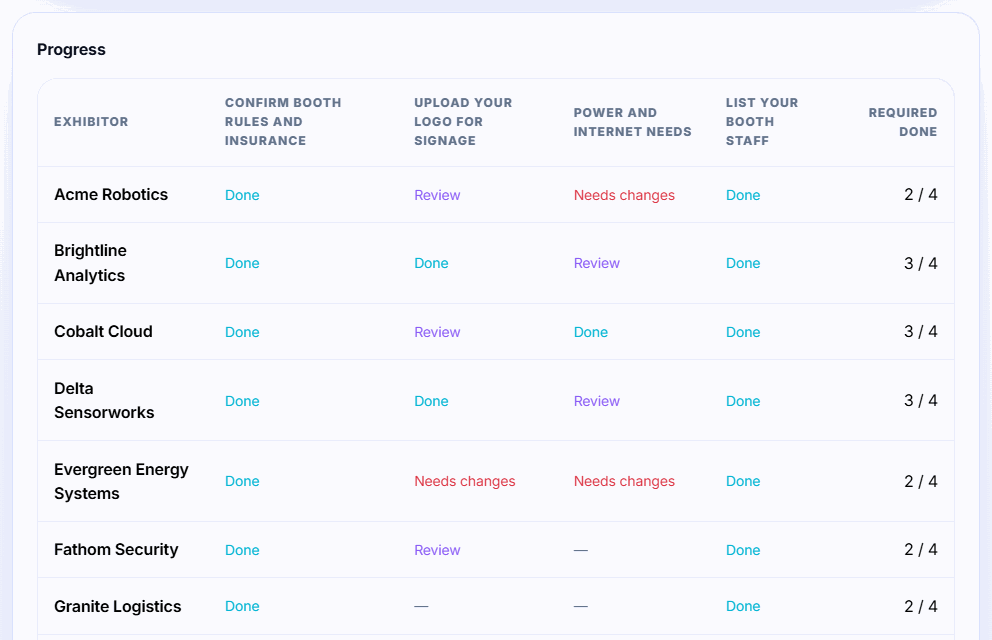
The Progress grid shows each exhibitor's status per task and how many required tasks they've finished.
Task types
| Type | Use it for | Review |
|---|---|---|
| Confirm (checkbox) | Agreeing to rules, confirming move-in times | Done straight away |
| Answer a question | Power needs, Wi-Fi, company description | Optional |
| Upload a file | Logos, insurance certificates, signed forms | Optional |
| List booth staff (creates their badges) | Collecting staff names for badges | Done straight away |
Review uploads and answers before marking them done is on by default. Turn it off for a task if you don't need to check submissions. Untick Required for optional tasks; optional tasks never trigger reminders.
Staff badges
Each person an exhibitor lists becomes an attendee with the ticket type Exhibitor staff and the exhibitor's company, ready for printing. The quota (default 4, up to 100) caps how many each exhibitor can list.
Staff badges count toward your attendee limit. Exhibitor staff are attendees, so allow for them when you choose a plan. If an exhibitor removes someone from their list, that person's attendee record isn't deleted.
Sending work back
When you click Ask for changes, the exhibitor gets an email titled Action needed: [task] with your note. The task shows Needs changes in their checklist and your Progress grid until they resubmit.
Reminders
Exhibitors with required tasks due within 3 days, or up to 14 days overdue, get one reminder email a day listing those tasks. You don't need to do anything to turn this on.
Uploaded files are private. Only you can download them, from the review list.
Related guides
- Complete your exhibitor checklist Confirm details, answer questions, upload files and list your booth staff before the show, all in one place.
- Invite exhibitors to your event Add exhibitors one by one or from a CSV, send their invite emails, and see who has joined and started scanning.
- Add booths and assign exhibitors Add booths one at a time or a whole row like A1 to A20, then assign each exhibitor to their booth.
Still stuck?
Tell us what you were trying to do and what you saw. We'll help you sort it out.