
Register walk-ins at the door
Add people who arrive without a ticket, print their badge on the spot, and let the kiosk take self-registrations.
On this page
Walk-ins are people who arrive without a ticket. You can register them at the walk-in desk or a volunteer station, or let them sign themselves up at the kiosk.
Register a walk-in
-
Step 1: Open the walk-in desk
On your event's Attendees page, choose Actions → Walk-in desk.
-
Step 2: Fill in the form
Enter at least a first or last name. Email, phone, company, job title and ticket type are optional. Ticket type defaults to Walk-in.
-
Step 3: Save
Click Register walk-in. If an active attendee already has that email, Badgetrac reuses their registration instead of creating a duplicate.
-
Step 4: Print the badge
Click Print badge in the confirmation box. The badge opens as a PDF in a new tab.
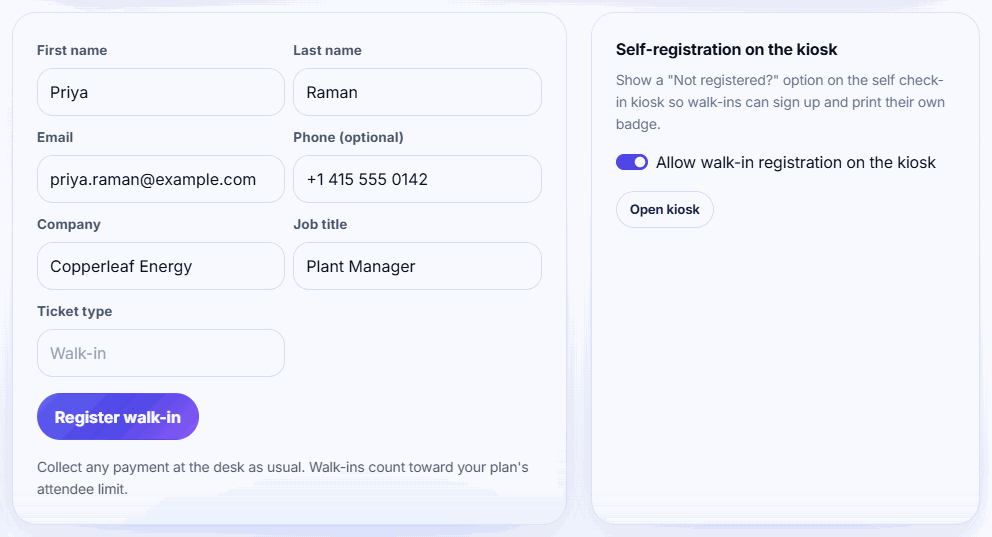
Tip: Collect any payment at the desk as you normally would. Badgetrac records the registration but doesn't take payment for walk-ins.
Duplicate emails
If someone with an active ticket gives the same email (upper or lower case doesn't matter), you'll see Name is already registered with that email. Badgetrac uses their existing registration, so their badge, leads and check-in stay on one record. Cancelled or refunded tickets aren't reused.
Walk-ins and your plan limit
Walk-ins count toward your plan's attendee limit like any other active attendee. If one more person would take the event over its limit, the desk shows This event is at its plan's attendee limit. It won't register anyone else until you upgrade from Event settings. See Choose a plan and what happens if you go over.
Other places to register walk-ins
- Volunteer stations: the Register a walk-in card registers and prints in one step with Register and print. See Set up volunteer stations.
- Self check-in kiosk (Growth plan and up): on the walk-in desk, turn on Allow walk-in registration on the kiosk. Attendees then tap Not registered? Sign up here on the kiosk.
Walk-ins get the ticket type you enter (Walk-in if you leave it blank). The live dashboard counts them in its Walk-ins tile.
Related guides
- Set up volunteer stations Give each check-in desk its own link and 6-digit PIN so volunteers can search, print and register walk-ins without your password.
- Run a self check-in kiosk Turn a tablet or laptop into a check-in screen: attendees type their email or scan their ticket and their badge prints.
- Choose a plan and what happens if you go over How attendee limits work, which tickets count, the grace margin over your limit, and how to upgrade without losing what you paid.
Still stuck?
Tell us what you were trying to do and what you saw. We'll help you sort it out.